

What Is a COA QR Code and How Does It Work for Peptide Companies?
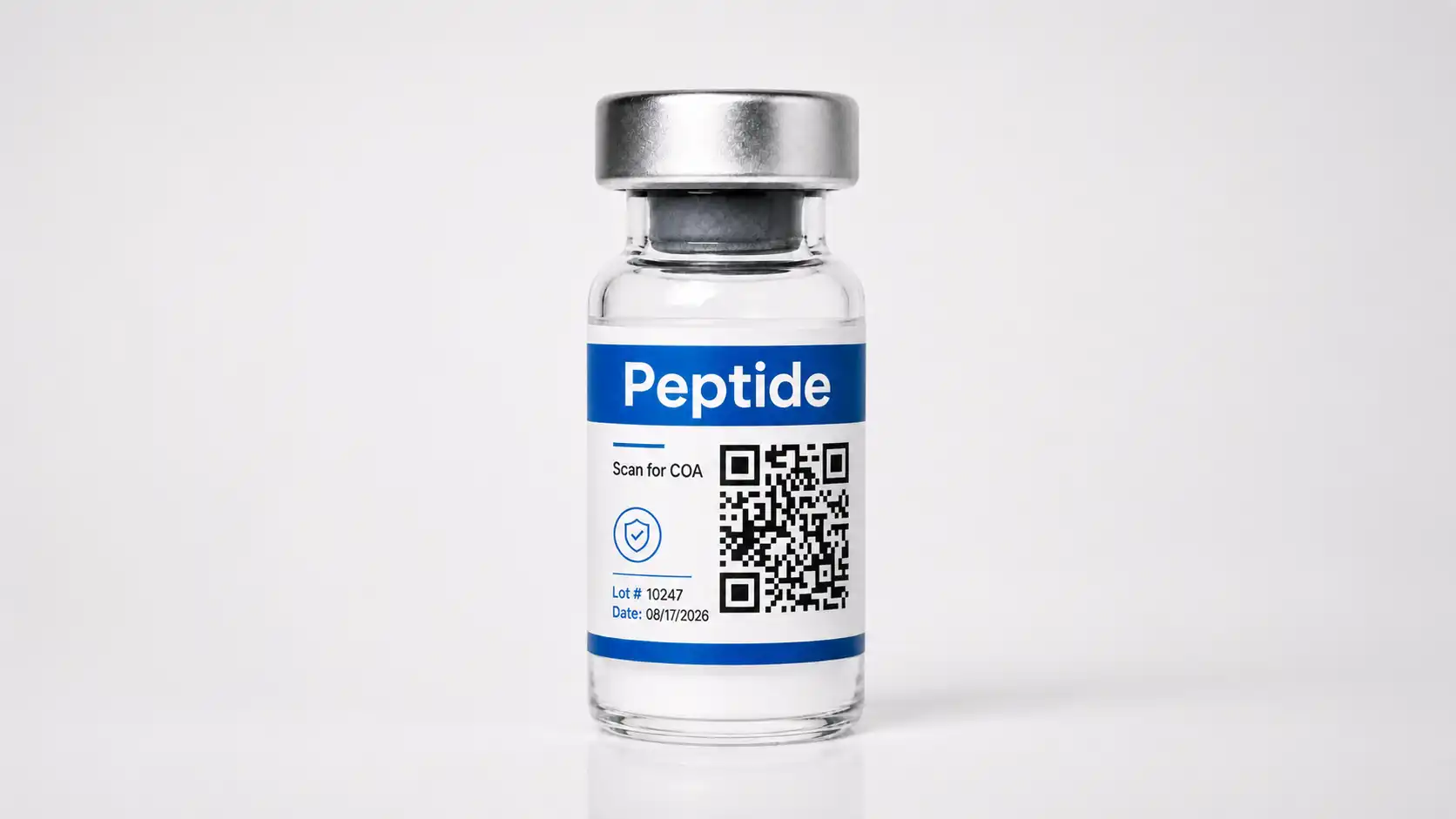
For peptide companies, a Certificate of Analysis can provide important testing information about a specific product lot. That information becomes more useful when customers can quickly connect the vial or package in their hands with the correct COA.
A COA QR code gives peptide companies a direct way to connect physical packaging with digital testing records. Instead of asking customers to visit a website, find a COA library, enter a peptide name, and search for the correct lot number, a QR code can take them directly to the COA associated with that product or lot.
The process can be simple: scan the code, open the provided link, and review the available testing information.
More advanced options from DupeBlock can connect the COA with lot information, product authentication, serialization, traceability, and scan monitoring.
For peptide companies managing multiple products and frequent production lots, that connection can make COA access much more organized for both the company and the customer.
What Is a COA QR Code for Peptides?
A COA QR code is a QR code printed on a peptide vial, box, label, or other packaging that connects the customer with a Certificate of Analysis or a digital page containing COA information.
A Certificate of Analysis typically documents testing performed on a particular product sample or production lot.
Depending on the peptide, laboratory, and testing performed, a COA may contain information such as:
- Peptide or product name
- Lot or batch number
- Testing date
- Laboratory information
- Test methods
- Purity results
- Identity testing
- Analytical results
- Certificate or report number
Some peptide companies provide COAs as downloadable PDFs or maintain a COA library on their website.
A QR code creates a more direct connection between the physical vial and its digital testing documentation.
For example, a vial labeled:
Lot # 10247
could include a QR code that opens the digital record specifically associated with lot 10247.
The customer no longer has to search through COAs for multiple production runs of the same peptide.
How Does a Peptide COA QR Code Work?
A COA QR code connects a printed code on the peptide packaging with a digital destination.
The options can vary depending on whether the company simply wants to provide COA access or also wants to add product authentication and traceability.
1. A QR Code Is Assigned to the Peptide or Lot
The first step is creating a QR code and connecting it with a digital record.
Peptide companies can structure this in several ways.
A single QR code could be used for every vial of a particular peptide. Scanning the code might send customers to a general COA library where they search for their lot number.
A more precise system assigns a different QR code to each production lot.
For example:
Peptide A, Lot 10247 → COA for Lot 10247
Peptide A, Lot 10419 → COA for Lot 10419
Peptide A, Lot 10733 → COA for Lot 10733
When a customer scans the vial, the system already knows which lot record to display.
Peptide companies can take the process further by assigning a unique serialized QR code to each individual vial or package.
That approach creates three potential levels:
Product-level code: identifies the peptide
Lot-level code: identifies the production lot
Serialized code: identifies the individual vial or package
Each option provides a different level of specificity, traceability, and verification.
2. The QR Code Is Printed on the Peptide Packaging
The QR code can be placed directly on the peptide vial label or on the accompanying box or packaging.
Common placement options include:
- Vial labels
- Product boxes
- Outer packaging
- Tamper-evident labels
- Inserts
- Secondary packaging
The code needs to remain easy to scan.
This can be especially important with peptide vials because the available label area may be small and the glass surface is curved.
A QR code should generally have:
- Adequate size
- Strong contrast
- Clear space around the code
- Sufficient print resolution
- A position that minimizes distortion from the curved vial
The company can also include a simple call to action such as:
Scan for COA
View Test Results
Verify Lot
Verify Product
Customers should immediately understand what they will receive after scanning.
3. The Customer Scans the Peptide Vial
Most smartphones can scan a QR code directly through the camera.
The customer points the phone at the code and taps the link that appears.
Depending on the company’s setup, the scan may open:
- A PDF Certificate of Analysis
- A lot-specific COA page
- A peptide product record
- A batch verification page
- A product authentication page
- A digital product record
Because most customers will scan the code from a phone, the destination should be designed for mobile use.
A 10-page laboratory PDF may contain valuable information, but it may not provide the clearest first screen for someone viewing it on a smartphone.
A dedicated verification page can present the key information first and provide access to the full laboratory report underneath.
4. The Peptide COA Is Displayed
After scanning, the customer can review the information associated with that peptide and lot.
For example, the page might display:
Product: Peptide A
Lot #: 10247
Testing Date: August 17, 2026
Lot Status: Recognized
Laboratory: Testing laboratory name
COA: View Full Certificate
The complete COA can then be available as a downloadable or viewable document.
This structure gives customers an immediate overview while preserving access to the full testing information.
5. The Customer Can Compare the Vial With the Digital Record
Lot-specific COA QR codes allow customers to compare the information printed on the vial with the information displayed online.
They might confirm details such as:
- Peptide name
- Lot number
- Testing date
- Certificate number
- Product identifier
- Other identifying information
For example, if the vial says:
Lot # 10247
the verification page should also identify:
Lot # 10247
That direct match creates a clearer connection between the physical peptide product and its testing documentation.
Peptide COA QR Codes vs. Standard QR Codes
Almost any QR code can technically link to a Certificate of Analysis.
The important distinction is what happens after the scan.
A standard QR code might send every customer to the same peptide COA library.
That process may look like this:
Scan QR code → Open COA library → Search peptide → Find lot number → Open COA
A lot-specific system can remove several steps:
Scan QR code → Open COA for that peptide lot
A serialized product verification system can go further:
Scan unique QR code → Identify individual vial → Verify product record → Display lot information → View COA
The QR code itself may look similar in each scenario.
The difference is the digital system behind it.
Why Lot-Specific COA QR Codes Make Sense for Peptide Companies
Peptide companies may produce the same peptide across many different production lots.
Each lot may have its own testing documentation.
Suppose a company produces 15 lots of the same peptide over the course of a year.
If every vial uses the same QR code, scanning it might send customers to a page containing 15 different COAs.
The customer then needs to:
- Find the lot number on the vial.
- Locate the peptide in the COA library.
- Find the corresponding lot.
- Open the correct report.
A lot-specific QR code simplifies that process.
If the customer has a vial from Lot 10247, scanning the QR code can take them directly to the digital record for Lot 10247.
This can support:
- Faster COA access
- Clearer testing documentation
- Easier lot verification
- Better organization of COA records
- Stronger product traceability
- A simpler customer experience
It also reduces the chance that someone will accidentally review the COA for a different lot.
Static vs. Dynamic QR Codes for Peptide COAs
Peptide companies should also consider whether they want to use static or dynamic QR codes.
Static COA QR Codes
A static QR code contains a fixed destination.
For example, the code might link directly to:
peptidecompany.com/coa/lot-10247.pdf
If the company later moves the COA to a different location, the printed QR code may no longer point to the intended destination.
Changing the destination generally requires creating a new code.
Static codes can work for simple situations where the destination is expected to remain permanent.
Dynamic COA QR Codes
A dynamic QR code allows the destination or associated digital record to be managed after the code has already been printed.
The physical QR code on the vial can remain the same while the company manages what information appears after the scan.
Depending on the platform, dynamic systems may also provide features such as:
- Scan analytics
- Destination management
- Lot management
- Product records
- Authentication information
- Scan history
- Digital COA management
This can be useful for peptide companies that regularly create new lots, manage large numbers of COAs, or want greater control over their product records.
Can a Peptide COA QR Code Verify That a Vial Is Authentic?
A COA QR code can support verification, but linking to a real COA does not automatically prove that the physical vial is authentic.
This distinction is important for peptide companies.
Suppose a company prints the exact same QR code on 50,000 vials.
A third party could copy that QR code and place it on unauthorized packaging.
When a customer scans the copied code, it could still open:
- The real peptide company’s website
- A legitimate COA
- A valid lot record
The digital destination may be legitimate even though the physical product is not.
Companies that want stronger product authentication can use unique serialization.
Instead of printing the same code on every vial, each individual product receives its own digital identifier.
The system can then use features such as:
- Unique vial serialization
- Individual product records
- Scan history
- Duplicate-scan detection
- Scan activity monitoring
- Product verification messages
- Lot-level information
For example:
Vial 00018472 → Lot 10247 → COA 10247
Vial 00018473 → Lot 10247 → COA 10247
Both products belong to the same lot and share the same COA, but each vial has its own unique digital identity.
That creates a stronger connection between the individual physical product and the manufacturer’s digital records.
What Should Customers See After Scanning a Peptide COA QR Code?
The experience after the scan deserves as much attention as the QR code itself.
Customers should be able to quickly identify the peptide and confirm that they are viewing information associated with the vial in their hands.
A peptide verification page might include:
- Peptide name
- Product image
- Lot number
- Verification status
- Testing date
- Laboratory information
- COA or report number
- Link to the complete COA
- Company information
- Product identifier
- Instructions for reporting a potential issue
For authenticated products, the page may also indicate whether the QR code corresponds with a recognized product record.
A simple layout could look like this:
PEPTIDE NAME
Product record recognized
Lot #: 10247
Test Date: 08/17/2026
Laboratory: XYZ Analytical Laboratory
View Certificate of Analysis
This allows customers to confirm the core information before opening the complete testing report.
Common Peptide COA QR Code Mistakes
Generating a QR code is easy. Building an effective COA system requires more planning.
Linking Every Peptide to the Same COA Library
A general COA library can provide testing information, but customers still need to search for the correct product and lot.
Lot-specific QR codes can make the connection much clearer.
Making Customers Manually Search for the Lot
If someone has already scanned a code printed on a vial from Lot 10247, asking them to type “10247” into another search box creates an unnecessary additional step.
The QR code can already carry that connection.
Linking to the Wrong or Outdated COA
Peptide companies should have a clear process for associating the correct testing document with each production lot.
Customers should be able to identify which COA corresponds with the product they purchased.
Printing QR Codes Too Small on Vial Labels
Peptide vials often have limited label space.
A code that looks acceptable on a computer screen may become difficult to scan once printed on a small curved vial.
Companies should test QR codes on actual production labels and packaging before release.
Sending Customers Directly to a Difficult-to-Read PDF
COAs often contain tables, laboratory data, test methods, and technical information.
That content may be difficult to review on a small phone screen.
A mobile-friendly page can display the most important identifying information first and provide the full COA as an additional resource.
Assuming a Shared QR Code Prevents Counterfeiting
A QR code that simply opens a COA does not necessarily authenticate a peptide vial.
Companies that want stronger counterfeit protection should consider serialized QR codes and individual product records.
How COA QR Codes Can Help Peptide Companies
A well-designed COA QR code system can do more than make laboratory reports easier to find.
Give Customers Faster Access to Testing Information
Customers can scan the vial instead of navigating through a website or contacting the company to request documentation.
Organize Peptide COAs by Lot
Each production lot can connect directly with its corresponding COA.
This can create a cleaner digital structure as the company produces additional lots over time.
Connect Vials With Lot Records
Lot-specific QR codes create a direct link between the product label and its digital testing record.
Improve the Verification Experience
A mobile-friendly verification page can combine product information, lot information, COA access, and authentication information in one place.
Add Product Authentication
When paired with serialization, QR codes can help identify individual peptide vials rather than simply identifying the product or lot.
The same scan used to view the COA can also help determine whether the code corresponds with a recognized digital product record.
Monitor Scan Activity
Dynamic systems may also allow peptide companies to see when and where codes are being scanned.
Unusual scan patterns or repeated scans of the same serialized identifier may provide additional information for product monitoring.
Choosing DupeBlock for Peptide COA QR Codes
DupeBlock gives peptide companies a way to connect each vial or package with the COA, lot information, and verification data associated with that product.
Instead of sending customers to a general COA library, DupeBlock can create a more direct experience. A customer scans the QR code on the peptide vial and can be taken to the digital record connected with that specific lot or product.
With DupeBlock, peptide companies can use QR codes to support:
- Lot-specific COA access
- Unique product serialization
- Individual digital product records
- Product verification
- Duplicate-scan detection
- Scan history and monitoring
- Product and lot management
- Mobile-friendly verification pages
This allows the same QR code to serve several purposes. Customers can review testing information, confirm that the lot number matches their vial, and access product verification information from one scan.
For peptide companies managing frequent production lots, DupeBlock can also provide a more organized way to add new COAs and connect them with the correct products over time.
Companies that want more than a basic link to a PDF can use DupeBlock to build a stronger connection between the physical peptide vial, its testing documentation, and its unique digital product record.
Make Peptide COA Access Part of a Better Product Verification Experience
A COA QR code for peptides creates a direct connection between a vial and the digital testing information associated with it.
At its simplest, scanning the QR code can give customers faster access to the Certificate of Analysis.
With lot-specific records, the system can take customers directly to the documentation associated with the production lot printed on their vial.
With serialization and authentication technology, the same QR code can also support individual product verification, traceability, and scan monitoring.
DupeBlock helps peptide companies connect physical products with secure digital verification experiences. By combining QR codes, individual product records, lot information, COA access, serialization, and authentication capabilities, peptide brands can give customers a clearer way to review product information and verify the product in their hands.
Learn more about how DupeBlock can help you create a QR-based COA and product verification system for peptide vials and packaging.